When to Switch Niches Clipping: Signs, Strategies, and Success Stories
Scrolling through TikTok, Instagram Reels, or YouTube Shorts, you might notice a trend: some clippers stick with one niche and thrive, while others stagnate despite posting consistently. The difference often comes down to knowing when to switch niches clipping.
Choosing the right niche - or knowing when to pivot - can be the difference between slow growth and viral success. But many creators wonder: "Do I need a new account? Will I lose my audience?" Let's break down what really happens when you change niches - and how to do it strategically.
Why Sticking to a Niche Isn't Always Enough
Many aspiring clippers start in a niche they're interested in - gaming, pets, life hacks - but not every niche performs the same for every creator. Stagnation happens when:
- Engagement plateaus despite consistent posting
- You struggle to find trending clips in your niche
- Monetization opportunities dry up
- Your own creativity feels blocked
Story snippet: A clipper on ClipsFast spent 5 weeks clipping gaming content for his theme page. Views plateaued, and even active bounties weren't converting. After switching to trending reaction clips, their engagement doubled in just two weeks.
Signs It's Time to Switch Niches
Knowing when to switch niches clipping is as much about observation as strategy. Look for these signs:
1. Consistent Engagement Decline
- Likes, shares, and comments drop for consecutive weeks.
- Your clips no longer resonate even when trending audio or formats are applied.
2. Limited Clip Availability
- You struggle to find enough high-performing content in your current niche.
3. Low Monetization Potential
- Active ClipsFast campaigns in your niche are sparse or highly competitive.
4. Creative Burnout
- You feel uninspired by current content. Creativity is crucial for growth.
What Happens When You Switch Niches
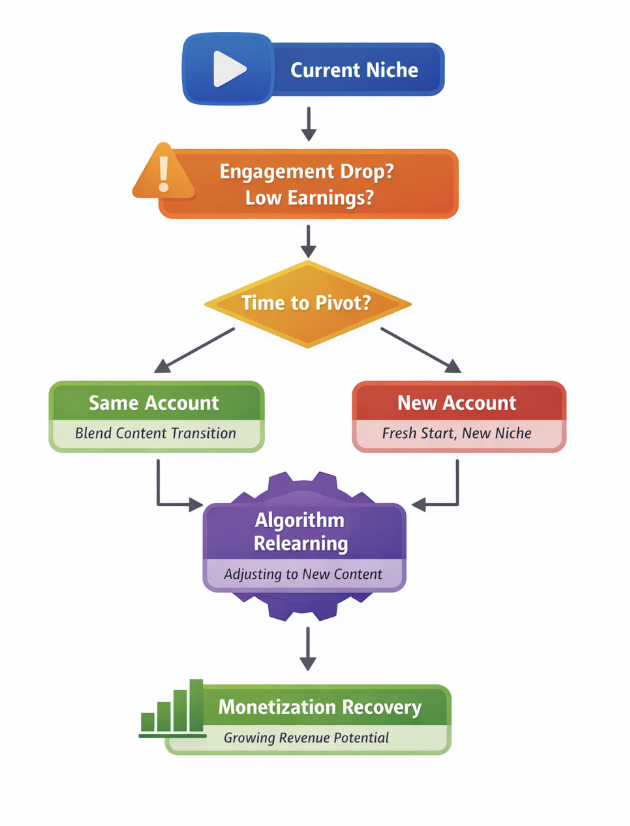
Switching niches doesn't just mean posting different content - it affects your account, audience, and monetization strategy. Here's what to expect:
Audience Retention
- Some of your existing followers may disengage if the new niche doesn't match their interests.
- But blending your old niche with new content can retain most of your audience.
Algorithm Reset
- Platforms may temporarily reduce reach while they "relearn" who to show your new content to.
- Consistency in posting and engagement helps the algorithm adapt faster.
Do You Need a New Account?
- Usually, no. Most creators can pivot within the same account.
- A new account may be warranted if the new niche is drastically different or you want a fully fresh start without confusing your existing followers.
Impact on Monetization
- ClipsFast earnings may dip initially while testing the new niche.
- Using AI tools like ChatGPT or Google Gemini to optimize captions, hooks, and trending formats can speed up revenue recovery.
Branding Considerations
- Update your bio, profile picture, and links to reflect the new niche.
- Communicate the pivot with your audience if possible - transparency builds trust.
How to Strategically Switch Niches
- Test Before Committing: Post 3-5 clips in the new niche to gauge engagement.
- Blend Your Old and New Niches: Transitional clips can bridge audiences.
- Example: Add humor to fitness clips before fully shifting to comedy.
- Leverage Trends and Bounties: Check ClipsFast Active Campaigns for high-performing opportunities.
- Use AI for Niche Insights: Tools like ChatGPT or Google Gemini can analyze trends and suggest high-performing niches or captions.
Tips for Choosing a New Niche
- Follow Trends, But Stay Authentic: Pick niches that align with your style and strengths.
- Check Monetization Opportunities Early: Evaluate ClipsFast campaigns in potential niches.
- Start Small, Scale Gradually: Test small batches of clips before fully committing.
- Pay Attention to Audience Feedback: Comments, DMs, and shares indicate whether your existing audience appreciates the pivot.
FAQ: Switching Niches Clipping
Q: Will switching niches hurt my existing account? A: Not necessarily. Most platforms allow pivots without creating a new account. Audience loss may occur but can be mitigated with blended content.
Q: Should I ever start a new account? A: Only if the new niche is radically different or if you want a fresh start without confusing followers.
Q: How long until my algorithm learns the new niche? A: Usually 2-4 weeks of consistent posting. Engagement and AI-optimized captions can speed this up.
Q: Can AI tools help with niche switching? A: Yes! ChatGPT and Google Gemini can suggest trending niches, generate captions, and help plan clip strategy.
Final Takeaways
Knowing when to switch niches clipping is as important as knowing your current niche. Monitor engagement, track monetization on ClipsFast, and leverage AI tools to pivot strategically. You don't usually need a new account - but be prepared for temporary algorithm adjustments and audience shifts.
With the right strategy, switching niches can rejuvenate creativity, expand reach, and maximize earnings.
Ready to explore new niches and monetize smarter? Sign up today and start clipping for success!