How to Write Captions for Viral Clips
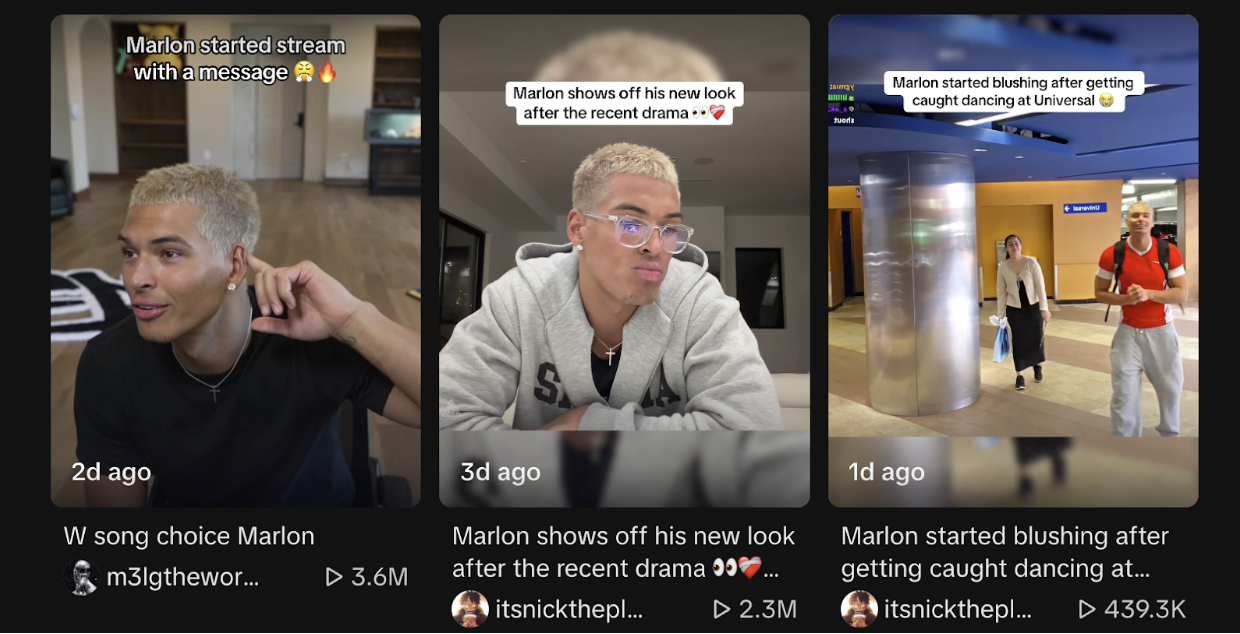
You've captured the perfect clip - maybe it's a hilarious TikTok moment, a jaw-dropping highlight, or a trending Reels segment. But here's the twist: your edit won't go viral on its own. One of the most overlooked factors in short-form success is the caption.
A caption isn't just text; it's the hook, the context, and sometimes the entire reason someone decides to watch your clip. Knowing how to write captions for viral clips can mean the difference between a scroll-by and a share, a double-tap and a comment, or even a payout from ClipsFast.
And here's a pro tip: you don't have to rely on guesswork. Tools like ChatGPT or Google Gemini can help you generate captions - either by describing the clip or uploading the video directly. AI can suggest hooks, keywords, and engagement-driven lines in seconds.
Why Captions Matter More Than You Think
Captions can:
- Grab attention instantly: With feeds scrolling fast, a punchy line stops thumbs.
- Add context to the clip: Even the funniest or most shocking clips can fall flat without explanation.
- Increase discoverability: Keywords in captions help platforms' algorithms surface your content.
- Encourage engagement: Questions, polls, and call-to-actions drive comments and shares.
Story snippet: Clipper F noticed their clips were getting views but almost no comments. By experimenting with captions that asked viewers "What would you do?" engagement skyrocketed, and ClipsFast earnings doubled in one week.
The Anatomy of a Viral Caption
Most viral captions share certain traits:
1. Hook First, Explain Later
- Lead with curiosity or emotion.
- Example: "I couldn't believe this happened in the last 5 seconds..."
2. Use Keywords Strategically
- Incorporate trending or niche-specific keywords to help the algorithm.
- Avoid keyword stuffing - natural flow works best.
3. Evoke Emotion
- Humor, shock, awe, or relatability work exceptionally well.
- Example: "When your Monday hits harder than expected..."
4. Call-to-Action (CTA)
- Ask viewers to comment, share, or check out your profile.
- Example: "Tag a friend who needs to see this!"
5. Keep It Short and Readable
- Most users scroll fast; concise captions outperform long-winded ones.
If you don't know what caption works, look up similar videos for that content category and copy their theme.
AI-Powered Caption Assistance
If you're stuck, AI can be your shortcut:
- ChatGPT: Describe your clip or paste a transcript, and ask for 5-10 caption options tailored for TikTok, Instagram, X, or YouTube Shorts. You can specify tone, humor, or engagement type.
- Google Gemini: Upload the video, and the AI can generate caption suggestions directly based on the content, highlighting key moments or trending hooks.
Many clippers test AI-generated captions and tweak them to match their style, maximizing both reach and engagement.
The more dramatic of a caption the better. It must catch a viewer's attention in sub 3 seconds!
Actionable Strategies to Write Captions for Viral Clips
- Test and Iterate: Try multiple caption variations per clip to see which drives the best engagement.
- Pair Captions with Editing: Overlays that reinforce your caption increase watch time.
- Leverage Trends: Browse trending hashtags and phrases for inspiration, then adapt them to your clip.
- Be Authentic: Captions that reflect your voice outperform generic or clickbait lines.
- Add a Micro-Story: Even one line of story can increase retention.
- Example: "He thought it was just a normal day... then THIS happened."
Common Mistakes That Kill Engagement
- Generic captions like "lol" or "funny clip"
- Overloading with hashtags or irrelevant keywords
- Misleading captions that don't match the clip content
- Forgetting the CTA or not prompting interaction
Story snippet: A clipper on ClipsFast initially copied viral captions verbatim. Engagement plateaued. After switching to captions that asked viewers questions or mentioned a dramatic event, average comments tripled.
FAQ: Captions and Virality
Q: How long should a caption be? A: Keep it under 100 characters for TikTok and Reels. First-line hooks is everything.
Q: Should I use hashtags in captions? A: Focus on trending and relevant hashtags rather than stuffing.
Q: Can I recycle captions from one clip to another? A: Occasionally, but tweak for context. AI tools can help you adapt captions for different clips.
Linking Captions to Monetization
Captions don't just drive views - they drive revenue. Engaged viewers are more likely to interact with active ClipsFast campaigns.
- Explore trending campaigns and bounty opportunities
- Track performance metrics and experiment with caption styles
- Sign up to monetize clips directly
Final Takeaways
Writing captions for viral clips is part art, part strategy, and part leveraging AI tools like ChatGPT or Google Gemini. Remember:
- Hook viewers immediately
- Use relevant keywords and trending phrases
- Prompt engagement with questions or CTAs
- Keep captions short, readable, and visually appealing
- Test, iterate, and track performance
The difference between a clip that's seen by a handful versus one that goes viral often boils down to the caption. With these strategies, AI assistance, and creative tweaking, you can maximize views, engagement, and earnings on ClipsFast.
Ready to start creating captions that go viral? Sign up now and turn your clips into earnings!